
Steam edition
IO Auto Clicker on Steam
The full auto clicker with customizable timing and multi-touch support, plus a drag-and-drop macro editor, recording and macro hotkeys. Built for grinding in Steam games and anything else on your PC or Mac.
- 10M+ downloads across all platforms
- Very Positive on Steam
- Windows and Mac
- Released November 2025
As featured on










Standard mode
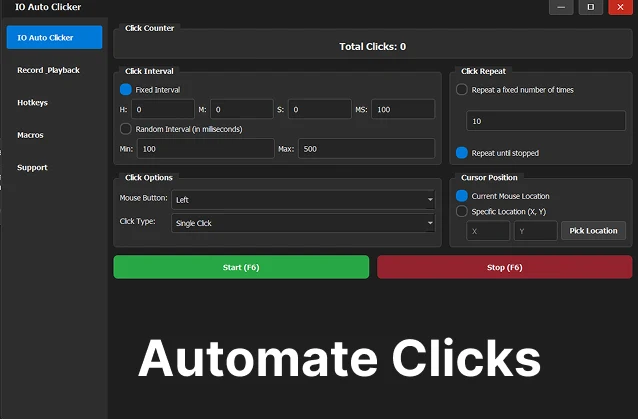
An Auto Clicker That Starts in Seconds
Set it up on one screen and press F6. Good for resource farming, idle games and any repeated clicking.
-
Precise intervals
Hours, minutes, seconds and milliseconds between clicks, with an optional random range.
-
Every mouse button
Left, right, middle and side buttons, as single, double or hold clicks.
-
Loops or fixed counts
Click a set number of times, or run until you stop it for AFK farming.
-
Click anywhere
Follow your cursor, or lock clicks to fixed coordinates with Pick Location.
-
Click counter
See the total clicks for the session while it runs.
-
Any window mode
Works with games in fullscreen, windowed and borderless modes.
Advanced mode
Build Macros by Dragging Blocks
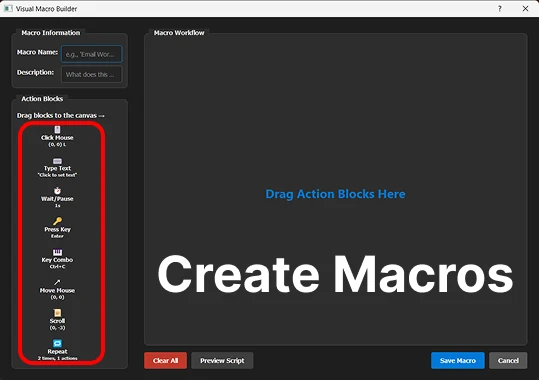
The visual macro editor is what the Steam edition adds. Drag action blocks onto the canvas, put them in order, and save the macro. No scripting.
- Click: Click at an exact screen position.
- Key: Press keys and key combos alongside clicks.
- Scroll: Scroll through menus and inventories.
- Interval: Wait a set time between actions.
- Repeat: Loop a set of actions, or loop forever.
- Random: Add randomness to any action.
- Custom: Group actions into reusable blocks.
Recording
Record It Once, Replay It Forever
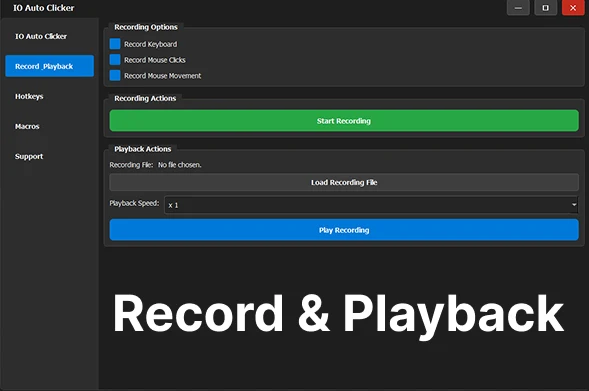
Press record and play through the task. IO Auto Clicker captures your clicks, key presses, scrolling and the timing between them. Replay it at any speed, save it to a file, or open it in the macro editor to fine-tune it.
Macro hotkeys
Give any macro its own keyboard shortcut and start it without leaving your game. Start, stop and pause are all customisable too.
Steam Edition vs the Free Version
IO Auto Clicker for Windows is also available free. Here’s what the Steam edition changes:
| Free version | Steam edition | |
|---|---|---|
| Price | Free | $4.99 |
| Runs on | Windows | Windows and Mac |
| Auto clicking | Yes | Yes |
| Record & Playback | Yes | Yes |
| Visual macro editor | No | Yes |
| Installed and updated by | Our installer | Steam |
If you only need clicking and recording on Windows, the free download covers it. Pick the Steam edition for the macro editor, for a Mac, or to keep it in your Steam library.
Why IO Auto Clicker
Built With Its Players
-
Discord community
Players share how they use it, report issues and suggest what to build next.
-
Fast fixes
Feedback is reviewed regularly, and most problems are fixed within 24 to 48 hours.
-
Your language
The app supports multiple languages, so players around the world can use it comfortably.
How to Get It on Steam
-
Open the store page
Go to IO Auto Clicker on Steam, or search for “IO Auto Clicker” in the Steam store.
-
Buy and install
Add it to your cart for $4.99. Once it’s in your library, click Install.
-
Launch it next to your game
Open IO Auto Clicker from your Steam library, set it up, then switch to your game and press F6.
System requirements
| Windows | Mac | |
|---|---|---|
| System | Windows 10 or later | macOS 11 or later |
| Processor | Intel Pentium or better | Apple M1 or Intel Core i5 |
| Memory | 1 GB RAM (4 GB recommended) | 512 MB RAM |
| Storage | 500 MB | 200 MB |
Frequently Asked Questions
Does Steam allow auto clickers?
Yes. IO Auto Clicker is sold on Steam. Whether you can use it in a particular game depends on that game’s rules, and many online games ban automation. Check before you use it in multiplayer.
Is there a free version?
Yes. IO Auto Clicker for Windows is free, with clicking and Record & Playback. The Steam edition adds the visual macro editor and a Mac version.
Does it work with Steam games?
It works alongside games on Windows and Mac, in fullscreen, windowed or borderless mode. Run it next to your game and start it with a hotkey.
What do Steam reviews say?
It’s rated Very Positive: 129 of 159 reviews recommend it (September 2026). Read the reviews on Steam.