
On this page
Clicking the same button a few thousand times isn’t playing, it’s chores. A good auto clicker handles the chores: collecting resources, earning in-game currency, repeating the same action over and over.
To find the best options, our team spent over 100 hours testing 19 auto clickers in games like Cookie Clicker, Minecraft, Roblox, and mobile action, role-playing, and strategy games. We scored each one on customization, click accuracy, macro recording, ease of use, and safety.
Quick answer
IO Auto Clicker is the best auto clicker for most gamers: precise intervals, an F6 hotkey, and Record & Playback that captures your keyboard, clicks and mouse movement. For a simple free alternative on Windows, pick OP Auto Clicker; for extreme click speeds, Speed AutoClicker.
Download IO Auto ClickerThe Best Auto Clickers for Games in 2026
| Auto clicker | Price | Platforms | Start / stop | Best for |
|---|---|---|---|---|
| IO Auto Clicker Our pick | Free (Mac: 3-day trial) | Windows, Mac, Android, Chrome | F6 | Most gamers; macros |
| GS Auto Clicker | Free | Windows | F8 | Simple click sequences |
| MurGaa clickers | Trial, then from $5.99 / 6 months | Mac, Windows | Custom shortcut | Randomized clicking |
| OP Auto Clicker | Free | Windows | F6 | Quick, simple setup |
| Speed AutoClicker | Free | Windows | Custom (hold or toggle) | Very high click rates |
| Auto Mouse Click | Free trial, then paid | Windows, Mac | Custom shortcut | Complex scripted sequences |
| Free Mouse Clicker | Free | Windows | Ctrl+F2 / Ctrl+F3 | Beginners |
Prices and platforms are from each developer’s website in September 2026.
1. IO Auto Clicker Our pick
Start / stop: F6
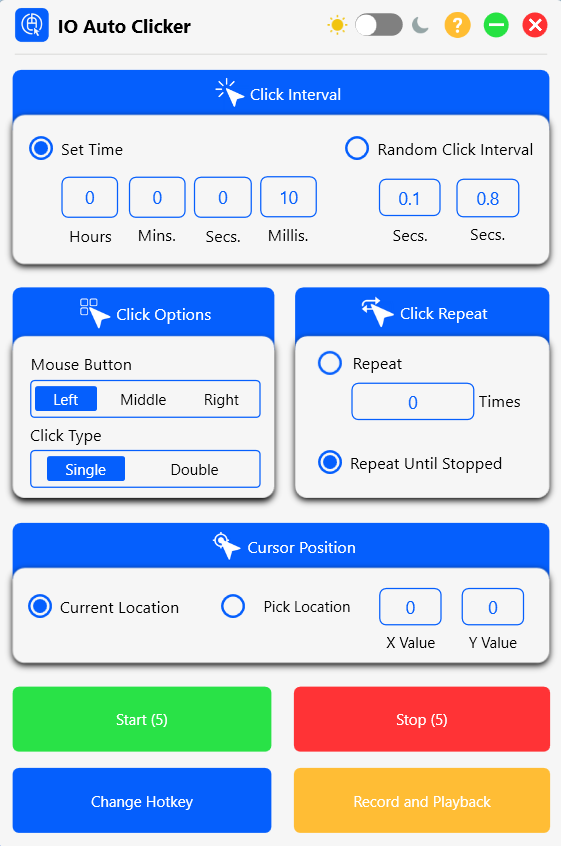
IO Auto Clicker stands out for combining a simple one-screen setup with some of the most capable macro recording we tested. It suits idle games, AFK farming, and repetitive tasks in games like Minecraft and Roblox.
Features
- Adjustable click interval: Set the gap between clicks in hours, minutes, seconds, and milliseconds, or use a random interval.
- Click options: Left, middle, or right button, with single or double clicks.
- Record & Playback: Record your keyboard, clicks, and mouse movement, then replay the sequence once, a set number of times, or on a loop until you stop it. Change the playback speed and save recordings to a file to load later.
- Cursor position: Click wherever the pointer is, or pick an exact X/Y location on screen.
- Customizable hotkey: Start and stop with F6, or change it to any key.
- Multiple platforms: Available for Windows, Mac, Android, and as a Chrome extension.
Pros
- Full macros Records your keyboard and mouse movement as well as clicks.
- Easy to use Every setting is on one screen, with a light and dark theme.
- Precise control Millisecond intervals, fixed or random.
- Lightweight Uses minimal system resources while you play.
Cons
- No settings sync Each device needs its own setup.
2. GS Auto Clicker
Start / stop: F8
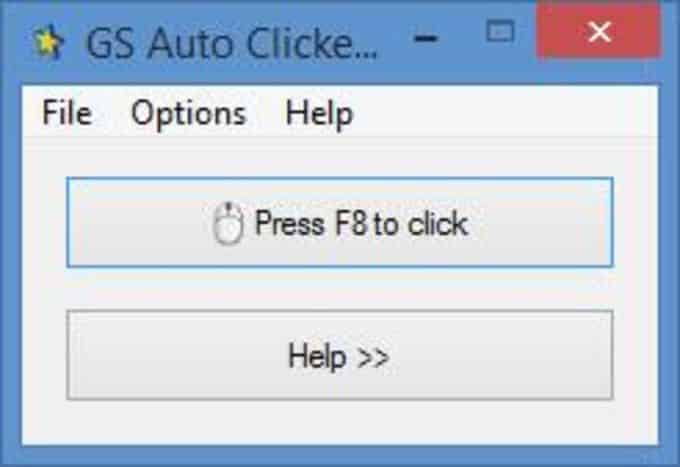
GS Auto Clicker is a free Windows clicker made for idle games that ask you to tap thousands of times. Its main screen has one button, so there’s nothing to learn.
Features
- Multiple click recording: Record clicks at several screen positions and replay them as a sequence.
- Click interval: Set intervals in hours, minutes, seconds, or milliseconds.
- Repeat options: Click until stopped or a set number of times.
- Single or double clicks: Choose the click type in the options.
- System tray: Runs quietly in the background from the system tray.
Pros
- Very simple Press F8 and it starts clicking.
- Tiny download A small, lightweight program.
- Free No ads or subscription prompts.
Cons
- Basic interface Settings are tucked away in menus.
- Windows only No Mac or mobile versions.
3. MurGaa clickers
MurGaa makes several clickers for Mac and Windows, including Auto Clicker ($6.54 for 6 months after a free trial) and Random Mouse Clicker ($5.99 for 6 months). Download them only from the official MurGaa website to be sure you’re getting the genuine, safe version.
Features
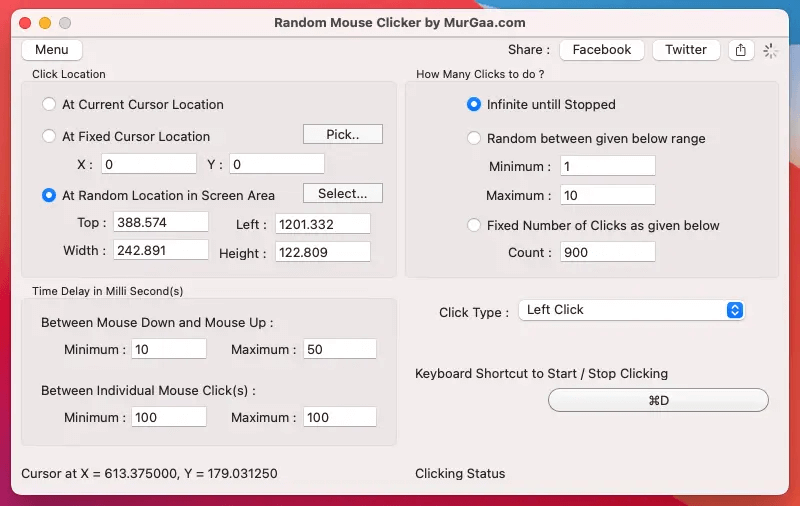
- Random location clicking: Click at random points inside an area you select on screen (Random Mouse Clicker, pictured).
- Delay ranges: Set minimum and maximum delays between clicks and between mouse down and up.
- Flexible click counts: Click until stopped, a fixed number of times, or a random count within a range.
- Location options: Click at the current cursor location, a fixed point, or a random area.
- Keyboard shortcut: Start and stop clicking with a shortcut you choose.
Pros
- Randomization Random areas, delays, and counts give a more natural pattern.
- Mac support Works on Intel and Apple silicon Macs, with Windows versions too.
- Detailed control Coordinates and timings are fully adjustable.
Cons
- Paid after the trial Unlocking costs $5.99-$6.54 for 6 months of use.
- Dated design The interface looks older than modern clickers.
4. OP Auto Clicker
Start / stop: F6
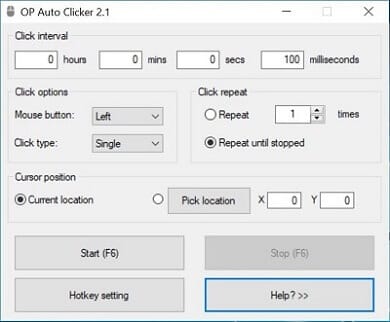
OP Auto Clicker is one of the most popular free Windows clickers, loved for its simple interface. Players use it for Cookie Clicker, Clicker Heroes, Realm Grinder, and Minecraft. See how it compares in configuring your mouse for an auto clicker.
Features
- Click location: Click where the cursor is, or at a fixed X/Y location.
- Repeat control: A set number of clicks, or repeat until stopped.
- Click interval: Hours, minutes, seconds, and milliseconds.
- Mouse buttons: Left, right, or middle, with single, double, or triple clicks.
- Saved settings: Remembers your settings between sessions.
Pros
- Minimalist interface Everything is on one small window.
- Free with no ads No ads or bundled toolbars.
- Background hotkeys F6 works while the app is minimized.
Cons
- No macro recording It can’t record a sequence of actions.
- Watch for copies Many look-alike versions exist online, so download from a trusted source.
5. Speed AutoClicker
Start / stop: Custom
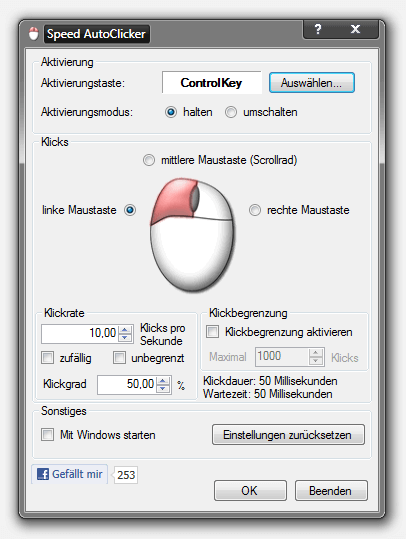
As the name suggests, Speed AutoClicker is built for speed. Its hold mode clicks only while you hold a key down, which suits games where you want to control each burst.
Features
- Click rate in clicks per second: Set the exact rate (10 CPS shown) instead of an interval.
- Hold or toggle: Click only while holding the key, or toggle clicking on and off.
- Mouse buttons: Left, middle, or right button.
- Click limit: Optionally stop after a maximum number of clicks.
- Random timing: Vary the click rate slightly for a more natural rhythm.
Pros
- Extremely fast Built for very high click rates.
- Portable Runs without installation.
- Free By independent developer Fabian Schlieper.
Cons
- Basic design Plain interface, partly in German in older versions.
- No macro recording It only clicks. No sequences.
6. Auto Mouse Click
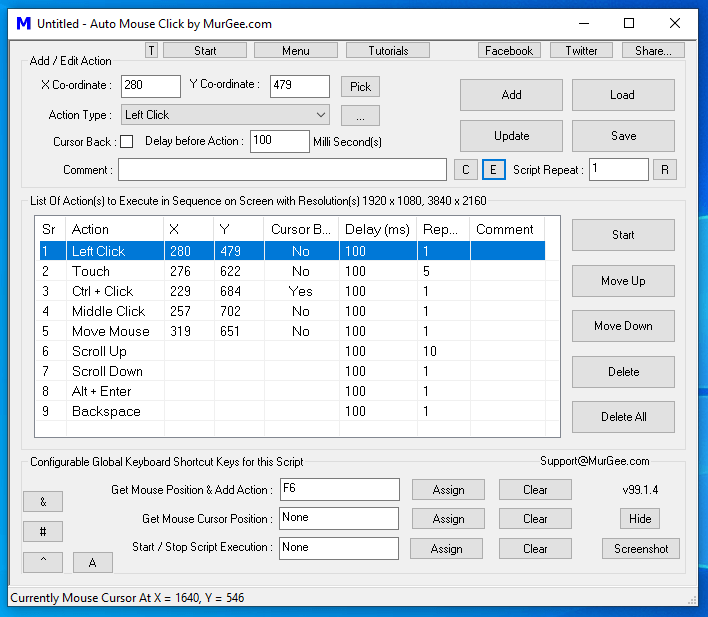
Auto Mouse Click, from the same family of developers as MurGaa, is more of a scripting tool than a simple clicker. You can set exact locations, click counts, and long sequences across different points on screen.
Features
- Action scripts: Build a list of clicks, keystrokes, scrolls, and mouse moves at set coordinates.
- Per-action delays and repeats: Each action has its own delay and repeat count.
- Script repeat: Run the whole script a set number of times.
- Save and load: Keep scripts for different tasks and games.
- Global shortcuts: Assign keys to add actions and start or stop scripts.
Pros
- Very flexible Combines mouse and keyboard actions in one script.
- Clear sequence view The table makes long scripts easy to edit.
- Windows and Mac Versions are available for both.
Cons
- Complex interface Takes time to learn.
- Paid after the trial A license is needed after the free trial.
7. Free Mouse Clicker
Start / stop: Ctrl+F2Ctrl+F3
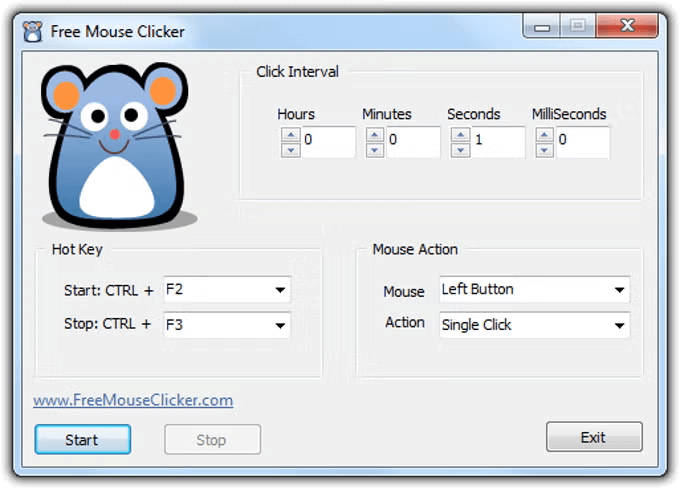
A CPU-friendly Windows clicker that covers the basics. Pick it if you want to click without learning any settings.
Features
- Click interval: Hours, minutes, seconds, and milliseconds.
- Hotkeys: Ctrl+F2 to start and Ctrl+F3 to stop by default.
- Mouse action: Left or right button, single or double click.
- Simple controls: Start, Stop, and Exit buttons.
Pros
- Beginner-friendly A simple interface with a friendly mouse mascot.
- Quick setup Ready to use in seconds.
- Free Freeware for Windows.
Cons
- Limited features No recording or fixed-location targeting.
- No dark mode Only a light interface.
What to Look for in an Auto Clicker for Gaming
Clicking options
Look for precise intervals down to milliseconds, a choice of mouse button and click type, and optional random timing for a more natural rhythm. Games respond differently to clicking patterns, so fine control matters.
Recording and mouse movement
For anything beyond one spot, you need a clicker that can record and replay sequences (mouse movement and keystrokes included) or click at set coordinates. Farming, crafting and multi-step tasks all need it.
Hotkeys
A good clicker lets you set your own start/stop key, works while it’s in the background, and stops instantly, so you never have to leave the game to control it.
Compatibility
Check that it runs on your device and works with your game. Some clickers suit browser games better than full-screen games, and on mobile you’ll need a dedicated app. See our Android and iPhone guides.
Ease of use
Features don’t help if you can’t find them. The best clickers keep the everyday settings on one screen and tuck advanced options away.
Security
Only download from the developer’s official website or an official app store. Many copies of popular clickers are bundled with unwanted software, so scan unfamiliar downloads with your antivirus.
Support
Regular updates, clear guides, and a developer who answers questions matter most when a game update changes how clicking works.
Play fair: many online games and servers don’t allow auto clickers, and some can ban accounts that use them. Check a game’s rules first, and stick to single-player, idle, and AFK tasks where automation is allowed.
Frequently Asked Questions
What is the best auto clicker for gamers?
IO Auto Clicker is our top pick for its precise intervals, F6 hotkey, and Record & Playback. OP Auto Clicker and GS Auto Clicker are good free alternatives on Windows.
What’s the safest auto clicker?
Any reputable clicker is safe when you download it from the developer’s official website or an official app store. Get IO Auto Clicker from our download page, the Mac App Store, or Google Play.
What auto clicker has a virus?
Safety depends on where you download from as much as on the program. Unofficial copies and repackaged installers on third-party sites can contain malware, so avoid them and scan any file you’re unsure about.
Is there a real auto clicker?
Yes. Auto clickers are real programs that simulate mouse clicks (and, in tools like IO Auto Clicker, keystrokes and mouse movement) to automate repetitive tasks.
What is the best PC auto clicker?
For most people, IO Auto Clicker. If you only need basic clicking, OP Auto Clicker is a light free option, and Speed AutoClicker is best for very high click rates.
Can you get banned for using an auto clicker?
In some games, yes. Many online games and multiplayer servers prohibit auto clickers and can ban accounts that use them. Single-player and idle games are usually fine. Check each game’s rules.
Conclusion
Auto clickers take the repetitive clicking out of gaming and everyday tasks. For most people, IO Auto Clicker is the best all-round choice, with its simple setup and Record & Playback. If you only need something basic and free on Windows, try OP Auto Clicker, and for extreme click speeds, Speed AutoClicker.