
Free auto clicker
Free Auto Clicker for PC, Mac and Mobile
Set the speed, pick the spot and press F6. IO Auto Clicker does the repetitive clicking while you do something better with your hands.
- 10M+ downloads across all platforms
- Very Positive on Steam
- Featured on How-To Geek, Screen Rant and Android Police
What Is an Auto Clicker?
An auto clicker is a program that clicks your mouse for you. You tell it how often to click, which button to use and where, then start it with a hotkey. It keeps clicking until you stop it.
IO Auto Clicker is our free auto clicker for Windows, with apps for Mac and Android. People use it for idle and clicker games, AFK farming in games like Roblox and Minecraft, filling in the same form over and over, and giving a sore wrist a rest.
Features
Everything on One Screen
No scripts or config files. Every setting sits in one window.
-
Click at any speed
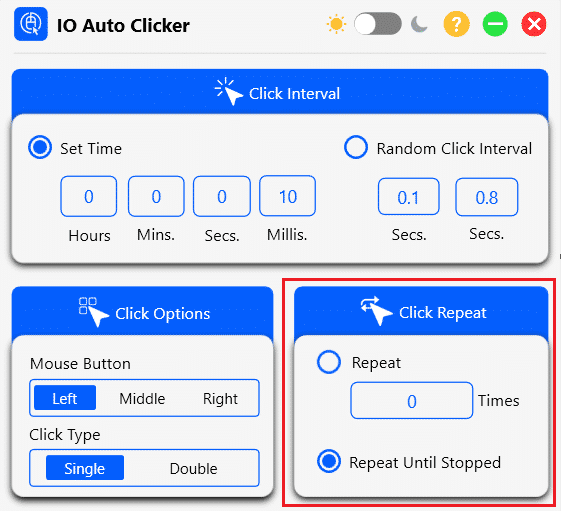
Set the gap between clicks in hours, minutes, seconds and milliseconds, or let it pick a random interval between two values.
-
Any mouse button
Left, middle or right click, as single or double clicks.
-
Click where you want
Follow your mouse pointer, or lock the clicks to one spot on the screen by its X and Y position.
-
Stop when you say
Repeat a set number of times, or keep clicking until you press the hotkey again.
-
F6 to start and stop
Press F6 from inside your game or app. Already using F6 for something else? Change the hotkey.
-
Record & Playback
Record your keyboard, clicks and mouse movement with F3, then replay it with F4: once, a set number of times or on a loop, at any speed.
How to Use IO Auto Clicker
-
Download and open it
Download IO Auto Clicker for Windows. It’s free.
-
Set the click interval
100 milliseconds (10 clicks a second) is a good start. Go lower for idle games, higher for everyday tasks.
-
Choose the button and position
Pick Left, Middle or Right click, and leave the position on Current Location to click wherever your pointer is.
-
Press F6
Move to your game or app and press F6 to start. Press it again to stop.
Platforms
Auto Clicker for Every Device
IO Auto Clicker runs on Windows, Mac and Android. On iPhone, iPad and Chromebook, there’s a built-in option too.
-
Windows
The full IO Auto Clicker, free. Also free on the Microsoft Store.
-
Mac
On the Mac App Store, free to download with a 3-day trial.
-
Android
Free on Google Play, with single, multi-target and swipe modes. No root needed.
-
iPhone and iPad
No app needed: Apple’s built-in Switch Control can tap for you. Our guide shows how to set it up.
-
Chromebook
Every Chromebook has an auto clicker built in, or you can use our Android app.
-
Steam edition
A paid edition ($4.99) for Windows and Mac that adds a visual, drag-and-drop macro editor.
Reviews
What Players Say on Steam
Rated Very Positive: 129 of 159 Steam reviews recommend it (September 2026). Read all of them, including the critical ones.
-
Works great. Much easier then other one I’ve tried to use as someone who has never used one before, so I’m just gonna give a positive review. 🙂
Non_b1nary_frog
-
It’s lowkey a chill auto clicker that works very well.
wilsontristan836 · 515 hrs
-
Best autoclicker eva!!!!
Drooling Goblin · 277 hrs
Is IO Auto Clicker Safe?
Yes, when you get it from us. Download it from this site or one of our official listings: the Microsoft Store, Steam, the Mac App Store or Google Play. Found it somewhere else? Don’t install it. Many copies of auto clickers on download sites come bundled with adware.
Some antivirus programs flag every auto clicker as “potentially unwanted”, because controlling the mouse is what an auto clicker does. That’s a label for the whole category, not a malware verdict.
Will it get me banned?
It can, in the wrong place. Many online games, including most competitive ones and many Minecraft servers, ban automated clicking. Auto clickers belong in idle and incremental games, single-player grinding and repetitive desktop tasks. Check a game’s rules before you use one. More on what people use it for.
How Does IO Auto Clicker Compare?
| IO Auto Clicker | OP Auto Clicker | GS Auto Clicker | |
|---|---|---|---|
| Price on Windows | Free | Free | Free |
| Mac app | Yes | No | No |
| Android app | Yes | No | No |
| Start / stop key | F6 | F6 | F8 |
| Records keyboard and mouse | Yes | No | Clicks only |
OP and GS are fine if you only need simple clicking on Windows. Pick IO Auto Clicker if you want Record & Playback, or the same clicker on your Mac and phone. The full comparison of 7 auto clickers is in best auto clickers for games.
How Fast Can You Click?
Test your clicks per second, learn jitter or butterfly clicking, or check how fast your auto clicker runs.
- CPS Test Pick 1 to 60 seconds
- 1 Second CPS Test One all-out burst
- 5 Second CPS Test The standard test
- 10 Second CPS Test Speed and stamina
- 30 Second CPS Test Clicking stamina
- 60 Second CPS Test Clicks per minute
- Auto Clicker Test Real speed of your auto clicker
- Jitter Click Test Test your jitter clicking
- Butterfly Click Test Two fingers, one button
- Spacebar Counter Space bar presses per second
- Right Click Test Right mouse button speed
- Kohi Click Test The classic PvP click test
- Drag Click Test How high can drag clicking go?
- Double Click Test Check your mouse for double clicks
- Scroll Test Mouse wheel scrolls per second
- Reaction Time Test How fast are your reflexes?
Frequently Asked Questions
Is IO Auto Clicker free?
Yes, on Windows, both from this site and the Microsoft Store. The Android app is free with ads. The Mac app is free to download with a 3-day trial, and the Steam edition with the macro editor costs $4.99.
How do I use IO Auto Clicker?
Set the click interval, choose the mouse button and where to click, then press F6. Press it again to stop. Our settings guide explains every option.
How fast can it click?
You set the interval down to the millisecond. At very short intervals, the limit is what your computer and the app you’re clicking in can keep up with. Measure it with the auto clicker test.
Is there an auto clicker for iPhone?
iPhone and iPad have one built in. Switch Control can record a tap and repeat it in any app, with nothing to download. Follow our iPhone auto clicker guide.
Does it work on a Chromebook?
Yes. Use the Chromebook’s built-in automatic clicks, or install our Android app from Google Play. See the Chromebook guide.
Are auto clickers legal?
Yes. The rules that matter are each game’s terms of service: many online games ban automation, which puts your account at risk.
Give Your Hands a Break
Free for Windows. Set it up in a minute, then press F6.
Download IO Auto Clicker