
On this page
Minecraft asks for a lot of clicking: grinding mob farms, bridging, placing hundreds of blocks, mining for hours. An auto clicker takes that repetitive work off your hands, in both Java Edition and Bedrock Edition.
Quick answer
Download IO Auto Clicker, choose Left click, set the interval to 625 ms for full-damage sword hits in Java Edition, select Repeat Until Stopped, and press F6 inside Minecraft. Use Right click for placing blocks, and Record & Playback for mining, which needs the button held down.
Download IO Auto ClickerThe Best Auto Clicker for Minecraft in 2026
Minecraft, like Roblox, is one of the games people use an auto clicker for most. Whatever you pick, download it only from an official source. Many clickers on third-party download sites come bundled with malware.
IO Auto Clicker has everything you need for Minecraft:
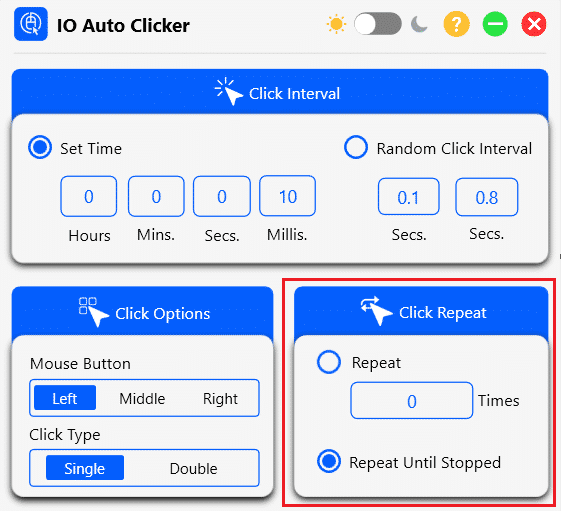
- Precise intervals: set the gap between clicks in hours, minutes, seconds, and milliseconds.
- Left, middle, or right click, in single or double clicks.
- Repeat Until Stopped for AFK sessions, or a set number of clicks.
- A start/stop hotkey: F6 by default, and it works while Minecraft is in focus.
- Record & Playback to repeat a sequence of actions, including holding a button down.
How to Set Up an Auto Clicker in Minecraft
-
Install IO Auto Clicker
Download IO Auto Clicker for Windows, or get it from the Mac App Store if you play on a Mac. Open it next to Minecraft.
-
Choose the mouse button
In Minecraft, left click attacks and breaks blocks, and right click places blocks and uses items. Pick the one that matches what you want to automate.
-
Set the interval and repeat
Enter a click interval (see the best settings below) and choose Repeat Until Stopped under Click Repeat.
-
Keep “Current Location”
Minecraft always aims at the center of the screen, so keep the cursor position on Current Location. Pick Location isn’t needed.
-
Start and stop with F6
Go back into Minecraft, aim at your target, and press F6 to start. Press it again to stop.
Tip: in Java Edition, press F3 + P to turn off “Pause on lost focus”. Minecraft then keeps running if you click on another window, so your AFK session doesn’t stop.
Best Auto Clicker Settings for Minecraft
Faster isn’t always better. Since version 1.9, Java Edition has an attack cooldown: each weapon needs time to recharge, and hitting before it does deals only a fraction of the damage. Bedrock Edition has no cooldown.
AFK mob or XP farm (Java Edition)
- Mouse button
- Left
- Interval
- 625 ms (sword) · 1,000 ms (axe)
- Click repeat
- Repeat Until Stopped
- Start / stop
- F6
A sword recharges in 0.625 seconds, so a 625 ms interval gives full-damage hits every time. Axes are slower, so use about 1,000 ms. This is the most popular use of an auto clicker in Minecraft: stand at your mob farm and let it collect drops and XP.
Attacking in Bedrock Edition
- Mouse button
- Left
- Interval
- 50-100 ms
- Click repeat
- Repeat Until Stopped
- Start / stop
- F6
With no cooldown in Bedrock, faster clicks mean more hits. Very short intervals can overwhelm the game, so start around 100 ms.
Placing blocks and using items
- Mouse button
- Right
- Interval
- 100-250 ms
- Click repeat
- Repeat Until Stopped
- Start / stop
- F6
Right-click automation helps with building, bridging, planting crops, and any other action you repeat with the use button.
Mining with Record & Playback
Mining works differently: Minecraft breaks a block only while you hold the button down. Repeated clicks keep restarting the break, so a normal click interval won’t mine.
Use IO Auto Clicker’s Record & Playback instead. Press F3 to start recording, hold left click on the block for as long as you want to mine, then stop the recording and save it. Press F4 to play it back, and IO Auto Clicker holds the button down exactly as you recorded. It works well for a cobblestone generator or a long tunnel. Set playback to loop until you stop it for long mining sessions.
You can record any sequence the same way, such as a building pattern you repeat or a series of actions at your farm.
Auto Clicker for Minecraft Bedrock and Mobile
Bedrock on Windows works the same as Java: use IO Auto Clicker with the settings above. On phones and tablets (formerly Pocket Edition), you’ll need a mobile auto clicker:
Android
Install IO Auto Clicker from Google Play, allow it to perform taps, place the target on the attack or use button, and start it from the floating panel. See our Android guide.
iPhone and iPad
Use Apple’s built-in Switch Control to record and replay taps. No app needed. Follow our iPhone and iPad auto clicker guide.
Auto clickers don’t work on game consoles such as Xbox, PlayStation, or Nintendo Switch.
Can You Get Banned for Using an Auto Clicker in Minecraft?
In single-player and your own worlds, using an auto clicker is up to you. On multiplayer servers, it depends on the server’s rules, and many popular servers ban auto clickers and macros, especially in PvP. Their anti-cheat systems can detect perfectly regular clicking, and breaking the rules can get your account banned from that server.
Check a server’s rules before you use an auto clicker there, and stick to AFK farms and building where it’s allowed.
Frequently Asked Questions
What is the best auto clicker for Minecraft?
IO Auto Clicker. It has millisecond intervals, left/right click, Repeat Until Stopped, an F6 hotkey, and Record & Playback for mining and repeated sequences. Download it here.
What click speed is best for Minecraft?
In Java Edition, match the attack cooldown: 625 ms for a sword (1.6 clicks per second) and about 1,000 ms for an axe. In Bedrock Edition, there’s no cooldown, so 50-100 ms works well. Want to know your own speed? Try our CPS test.
Does an auto clicker work in Minecraft Bedrock?
Yes. On Windows, IO Auto Clicker works in Bedrock the same way as in Java. On Android, use the IO Auto Clicker app, and on iPhone or iPad, use Switch Control.
Can you auto mine in Minecraft with an auto clicker?
Not with repeated clicks, because mining needs the button held down. Use IO Auto Clicker’s Record & Playback: record yourself holding left click on a block, then play the recording back.
Is using an auto clicker allowed in Minecraft?
In single-player worlds, yes. On multiplayer servers, it depends on each server’s rules, and many ban auto clickers, especially in PvP. Check the rules before you use one.
Why does Minecraft pause when I switch windows?
Java Edition pauses when it loses focus. Press F3 + P to turn that off, or start and stop the auto clicker with F6 without leaving the game.